
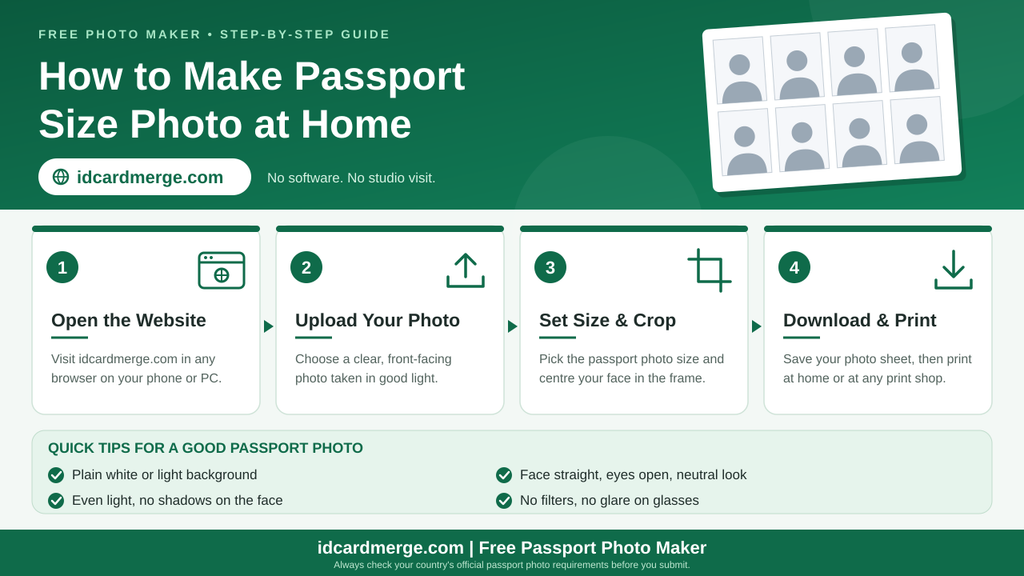
Make passport size photo online with IDCardMerge.com. Prepare a photo for printing, applications, and documents with simple steps. Check photo dimensions and official requirements before use.
Make Passport Size Image Online – Free Photo Maker
Making passport-size Image for job applications, school admissions, identity documents, and other paperwork can be simple with the right online tool. The Make Passport Size Photo tool on IDCardMerge.com aims to help users prepare their photos without complicated editing software. Start with a clear picture and use the available options to adjust it for your needs. Whether you need a photo for a Pakistani application, an international document, or a custom-size print, always check the required dimensions and photo rules before using the final image.
Make Passport Size Photos Online with IDCardMerge.com
An online passport photo tool can make photo preparation easier for people who want to handle the process at home. Instead of learning advanced photo-editing software, you can use a compatible browser and follow the tool’s instructions.
A well-prepared passport-size photo should have clear facial details, suitable lighting, and the correct dimensions for the intended application. Requirements can vary by country and document type, so choosing the right size is an important step.
How to Make Passport Size Photos Online
Preparing a passport-size photo is straightforward when you follow these steps:
- 1. Choose Your Photo: Start with a clear, recent picture. Make sure your face is visible and the image is not blurry.
- 2. Open the Online Tool: Visit IDCardMerge.com and open the relevant photo tool if available.
- 3. Set the Photo Size: Select the required dimensions using the options provided by the tool. Common examples include 35 × 45 mm and 2 × 2 inches, but the correct size depends on the application.
- 4. Adjust the Image: Use the available cropping or positioning controls to keep your face properly framed. Avoid stretching or distorting the picture.
- 5. Check the Background: Follow the background requirements for your document. Do not assume that one background colour is accepted everywhere.
- 6. Save Your Photo: If the tool offers a download option, save the prepared image to your device. Check the result before printing or uploading it.
Key Features of an Online Passport Size Photo Tool
The available features depend on the tool. Here are some useful functions to look for when preparing a passport-size picture.
| Feature | Description |
|---|---|
| Photo Size Selection | Prepare your image according to the required dimensions if supported. |
| Image Cropping | Adjust the visible area of your photograph. |
| Photo Positioning | Keep your face correctly framed in the image. |
| Background Requirements | Check whether background adjustment options are available. |
| Digital Photo Preparation | Prepare an image for an online form when it meets the stated requirements. |
| Printing Preparation | Save a suitable image for printing if the tool supports downloads. |
Make Passport Size Photos for Different Countries
Passport photo requirements differ between countries and document types. A photo accepted for one application may not be suitable for another.
For example, some applications may require a 35 × 45 mm photograph, while others may specify a 2 × 2 inch image. These are examples, not universal standards.
Before preparing your photo, check:
- Required dimensions: Confirm the exact width and height.
- Background colour: Follow the relevant authority’s instructions.
- Face position: Keep your face and head within the permitted framing.
- Image quality: Use a sharp picture with good lighting.
- Digital file requirements: Check the accepted format and file-size limit.
For passports and visas, use the official instructions provided by the relevant government authority. Correct dimensions alone do not guarantee acceptance.
Prepare Passport Photos for Online Submission or Printing
Once your image is ready, you may need it for an online application or a printed form.
For online submission, check the accepted image format, pixel dimensions, and maximum file size. If the application has a strict file-size limit, use an appropriate image-compression tool while keeping the photo clear.
For printing, confirm the physical dimensions and print settings. If you want several passport-size photos on one sheet, check whether the tool offers a multi-photo layout. Make sure the printed images retain the correct size.
Tips for a Clear Passport Size Photo
Follow these simple tips to get a better result:
- Take your picture in good lighting.
- Use a plain background that meets the application rules.
- Keep your face clearly visible.
- Avoid heavy filters and edits that change your appearance.
- Do not stretch the image to fit a required size.
- Check the final photo before downloading or printing.
- Review the official requirements before submitting your photograph.
Frequently Asked Questions
Can I make a passport-size photo online?
Yes. An online photo tool can help you prepare a picture by adjusting its crop or dimensions, depending on the available features.
What is the standard passport-size photo dimension?
There is no single size for every country or application. Common examples include 35 × 45 mm and 2 × 2 inches. Always confirm the required dimensions before preparing your image.
Can I make a passport-size photo on my mobile phone?
Yes, if the website and its photo tool support your mobile browser. You can select a picture, follow the available instructions, and save the result if downloading is supported.
Can I use my passport-size photo for a job application?
You can use a prepared photo if the employer accepts that size and format. Check the job advertisement or application instructions first.
Can I change the background of my passport-size photo?
That depends on the tool’s features. If background editing is available, use it carefully and follow the rules for your intended document.
Can I print multiple passport photos on one page?
This depends on whether the tool supports a multi-photo printing layout. Check the available options and confirm the physical dimensions before printing.
Will an online passport-size photo be accepted for a visa?
Not automatically. Acceptance depends on the visa authority’s photo requirements, including dimensions, background, face position, and image quality.
Conclusion
Preparing a passport-size photo does not have to be difficult. With a clear picture and the correct dimensions, you can get your image ready for many everyday document needs. IDCardMerge.com aims to make document preparation easier through accessible online tools.
Ready to prepare your photo? Visit IDCardMerge.com and explore the available tools. Check the photo requirements for your application, review your final image, and save or print it using the options provided by the tool.